
Bookkeeping for small business

Your books, done by an AI co‑worker. Approved by you.

Kiko categorizes transactions, reconciles accounts, chases invoices, and drafts the entries. You review the judgment calls in one tap, and nothing posts to your ledger without a rule or your sign-off.

  • Free to start
  • Import from QuickBooks Online
  • Real double-entry ledger
Morning briefing
$48,210Cash on hand
$12,640Overdue AR
4To approve
KKiko
Overnight I matched 37 bank transactions and drafted 4 items that need your call. Two invoices are past 30 days, and I have reminders ready.
Needs your approval
Reclassify $1,240.00 to Software Subscriptions
DebitCredit
Software Subscriptions1,240.00
Office Supplies1,240.00
Why: this vendor matches 14 earlier charges you coded to Software Subscriptions.
ApproveEditReject
How it works

Stop doing data entry. Start approving.

KikoBooks turns bookkeeping into a short daily review. Kiko does the preparation; you keep the judgment.

1

Connect your accounts

Bring over your history from QuickBooks Online, then connect Stripe, BILL, Gusto, your cards, and your sales channels. Map each one to your accounts once.

2

Kiko prepares the work

Every day Kiko categorizes transactions, matches deposits to invoices, reads bills and receipts, and drafts the entries and follow-ups that need doing.

3

You approve what matters

Judgment calls arrive as approval cards with Kiko’s reasoning. Approve, edit, or reject in a tap. Everything lands in a real double-entry ledger with a full audit trail.

The real product

This is what KikoBooks looks like

Actual KikoBooks screens. Company and customer names are demo data.

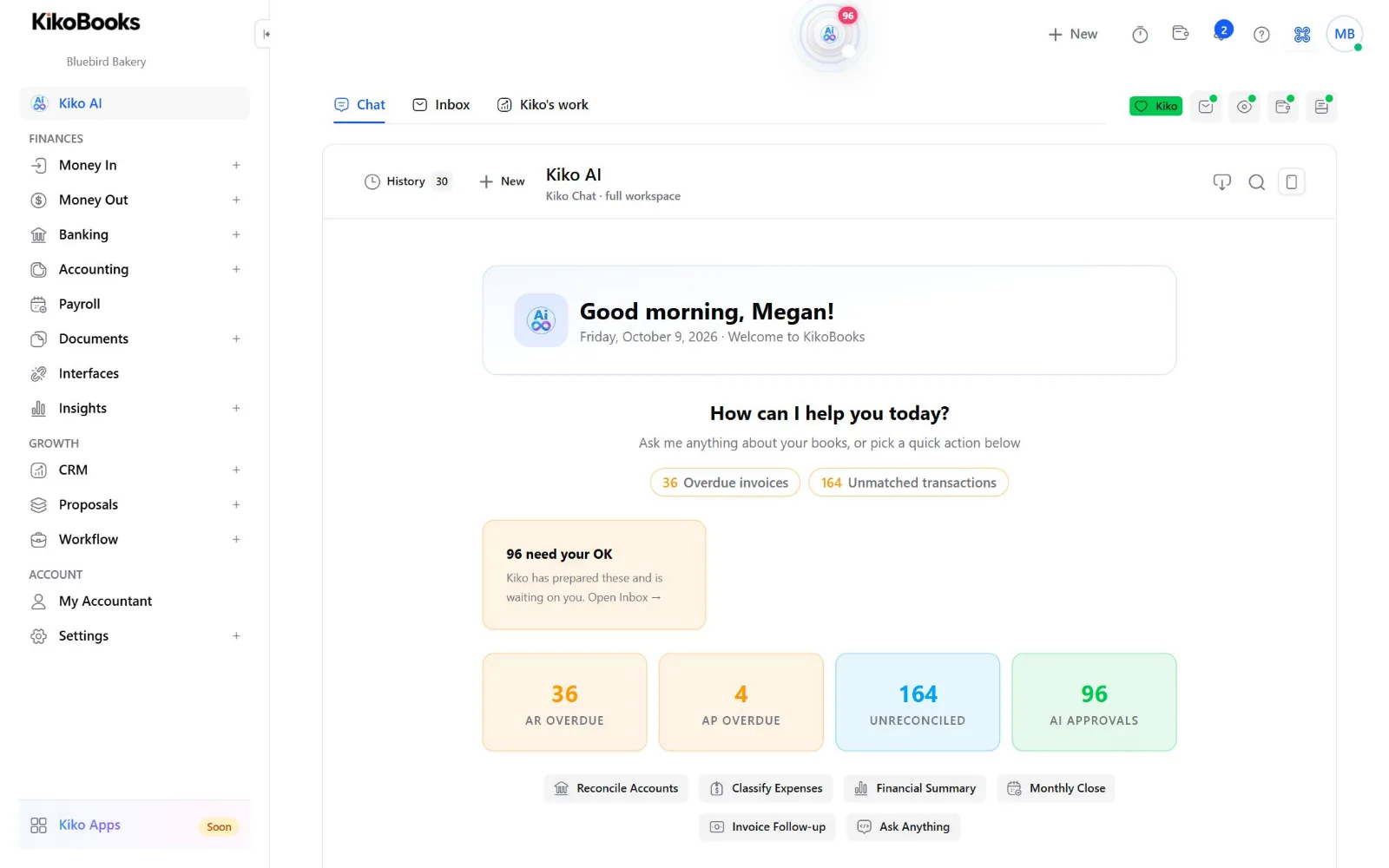
Kiko AI · home
KikoBooks Kiko AI home: greeting, overdue invoices, unmatched transactions, and the items waiting for the owner's approval
Start every day with Kiko. Overdue invoices, unmatched transactions, and everything Kiko has prepared for your OK, in one place.
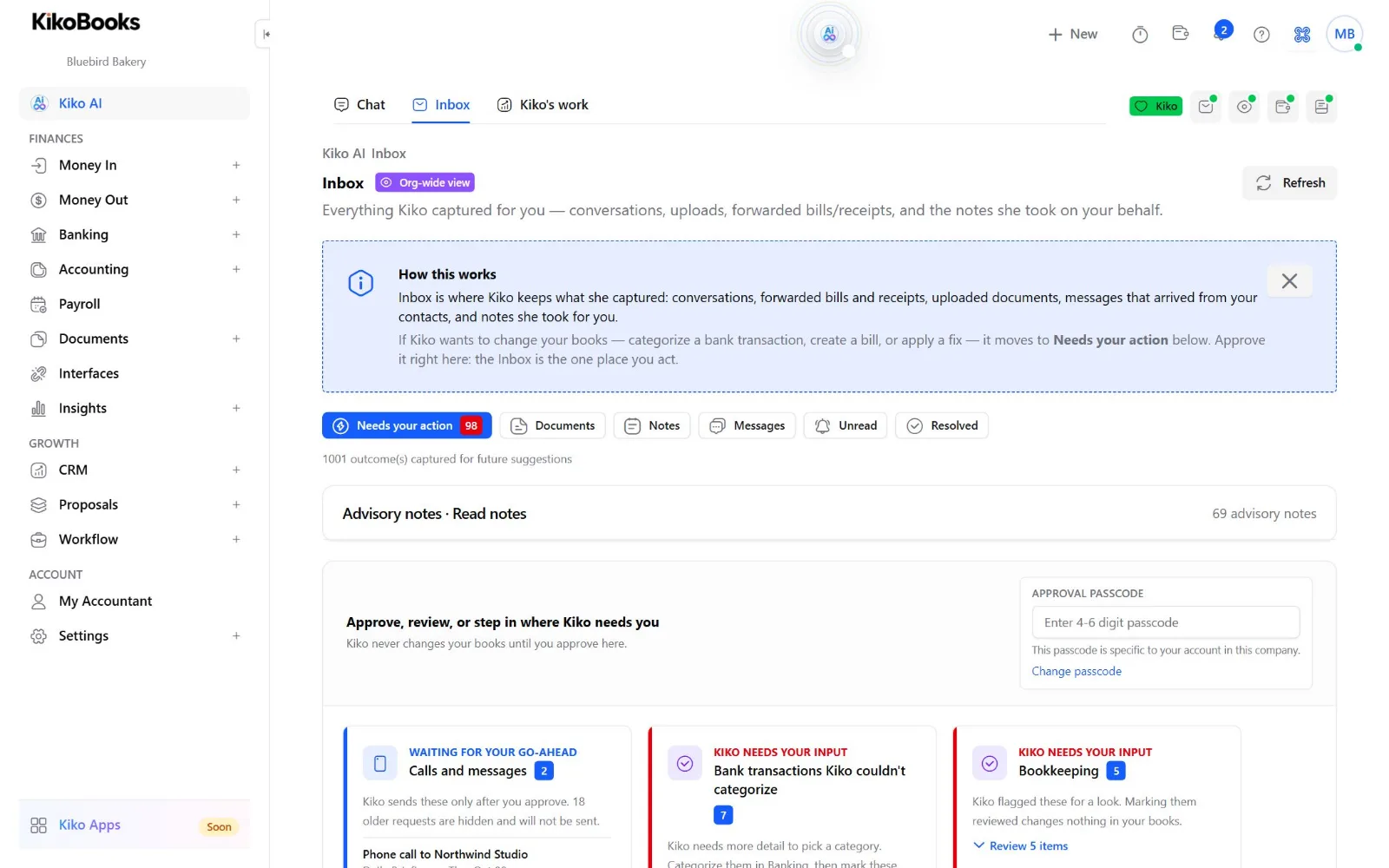
Inbox · needs your action
KikoBooks Inbox where the owner approves calls, messages, and bookkeeping changes Kiko prepared
One place to approve. Kiko never changes your books until you approve here.
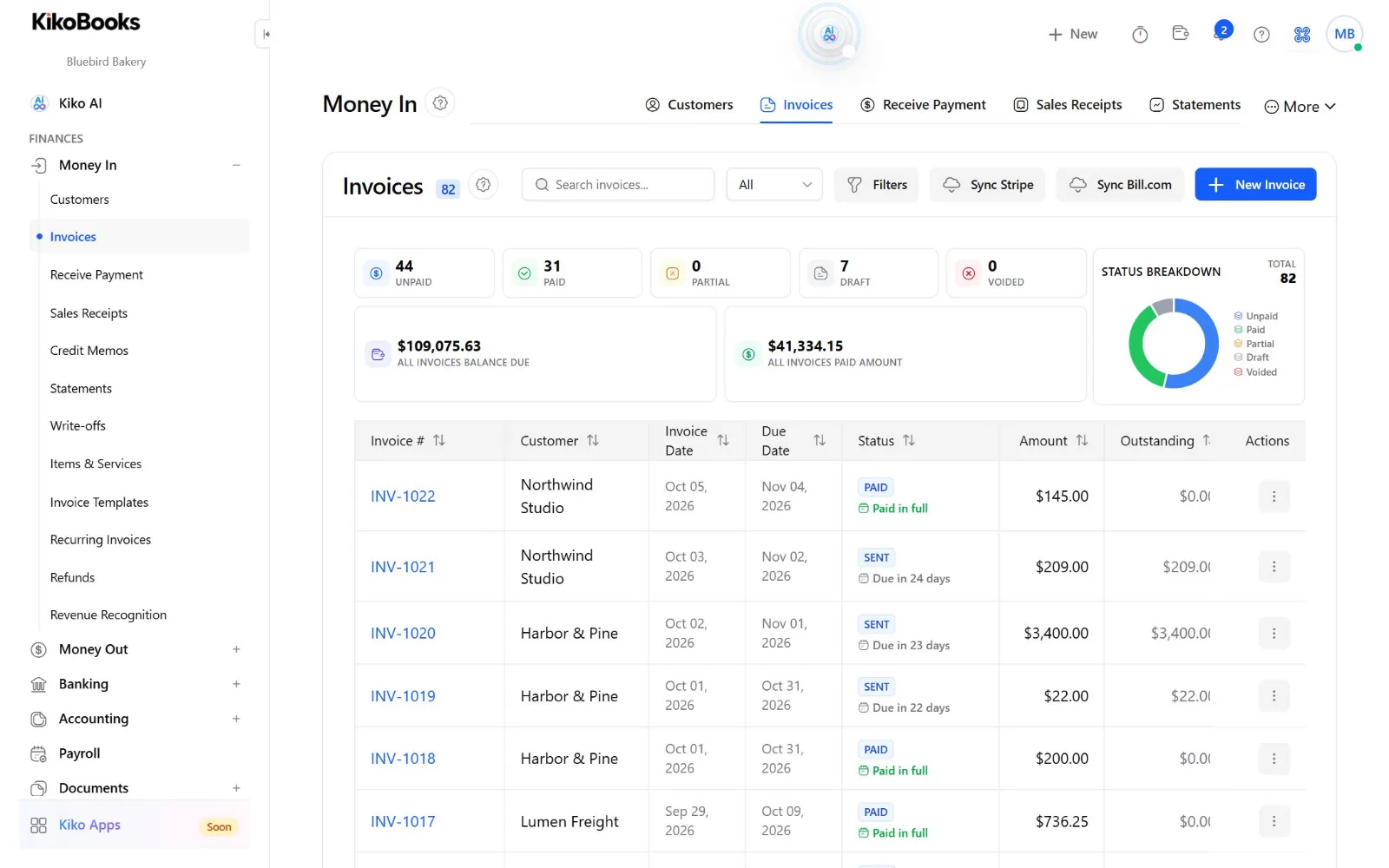
Money In · invoices
KikoBooks invoice list with paid, unpaid, and draft totals and Stripe and BILL sync
Real invoicing. Balances, status, and Stripe and BILL sync on the same screen.
Banking & reconciliation

Bank cleanup that does itself, until it shouldn’t

Kiko matches deposits and payments to invoices and bills, applies your bank rules, and catches duplicates before they reach the ledger.

  • Payouts from Stripe and payments through BILL reconcile against the invoices and bills behind them
  • Low-confidence and unusual items wait for you instead of guessing
  • Reconciliation sessions with suggested corrections and a full history
Bank feed · Business checking
Stripe payout
Matched to 6 invoices
$4,812.40Matched
Gusto payroll
Oct 1 pay run, mapped
−$9,306.12Posted by rule
Amazon Marketplace
Suggest: Office Supplies
−$86.19Suggested
Transfer from savings
No rule or match yet
$2,500.00Needs you
Invoicing & receivables

Get paid without chasing

Send branded invoices, take card and ACH payments through Stripe, and let Kiko prepare the follow-ups for anything that slips.

  • Recurring invoices and customer statements
  • Reminder emails and calls drafted for your approval, never sent on a guess
  • Proposal to project to invoice, without retyping
Receivables
Northwind Studio · INV-1042
38 days overdue
$6,400.00Overdue
Harbor & Pine · INV-1047
Due in 3 days
$2,150.00Open
Draft reminder
Email Northwind Studio about INV-1042
Friendly second reminder with a pay-now link. Kiko waits for your approval before sending.
SendEditNot now
Ledger & close

A real ledger your accountant will trust

KikoBooks is built on double-entry accounting, not a lightweight wrapper. Posted entries are never edited; corrections are new, traceable entries.

  • Chart of accounts, trial balance, P&L, balance sheet, and cash flow
  • Adjusting, accrual, and month-end entries drafted by Kiko for review
  • Every entry links back to its source and the approval behind it
Ask Kiko
Why did profit drop in September?
KKiko
Revenue was flat at $61.2k. Expenses rose $7.9k, mostly contractor costs ($5.1k) and a one-time software renewal ($2.4k). Want the P&L by month?
$61.2kRevenue
+$7.9kExpenses
18%Margin
Everything in one place

The rest of your back office, included

Bills & receipts

Snap a photo or forward a PDF. Kiko reads it and drafts the bill or expense with the source attached.

Payroll in the books

Each Gusto pay run posts to your wage, tax, and benefit accounts once you map it.

Sales channels

Settlement statements from Amazon, Shopify, Etsy, Walmart, and 10 more, checked to the penny before they post. See channels

Projects & proposals

Turn on CRM, proposals with e-signature, and projects when you need them. Off by default, so the app stays simple.

Your accountant, invited

Accounting firms on Accountant.World work in your books with the access you grant.

Chat, email, and voice

Work with Kiko in the app, get summaries by email, and talk to Kiko by voice. It only contacts customers when you approve.

You stay in control

Kiko sorts every action by risk, not by how sure it feels

Most AI bookkeeping asks you to trust a confidence score. KikoBooks follows clear rules about what an AI may do on its own.

Works freelyRead, sort, draftLooks things up, categorizes, summarizes, and prepares drafts. Nothing in your books changes.
Posts by your ruleRules you set onceBank rules and mapped Stripe, BILL, and Gusto activity post through the same audited engine every time.
Asks you firstJudgment callsAdjusting entries, reclasses, write-offs, credit memos, and unmatched items come to you with Kiko’s reasoning.
Always yoursCustomers and moneyAnything sent to a customer or vendor and every payment needs your sign-off. Posted entries are only ever reversed.

AI spend runs from a prepaid wallet with budgets and limits. Every decision Kiko makes is recorded and reviewable. How we protect your data

Meet the team

One co-worker, nine specialists behind it

You talk to Kiko. Kiko hands each job to the specialist built for it, so answers and drafts stay grounded in your actual books.

KikoYour co-worker in chat, email, and voice
LedgerInvoices, bills, and journal entries
BankCategorizing, matching, reconciling
DocIntelReads bills, receipts, statements
ComplianceReviews drafts; can veto them
PracticeProjects, CRM, and proposals
SyncKeeps connections healthy
OnboardSetup, imports, how-to answers
WatcherSpots unusual activity early
PlatformSettings, roles, and the AI wallet
Bring your own AI

Already use Claude, Cursor, or Copilot?

Connect them to your books with the open-source KikoBooks MCP server. 116 tools for bookkeeping, reports, banking, CRM, and workflow. Run it read-only, or allow changes your assistant asks you to confirm.

claude mcp add kikobooks \
  -e KIKOBOOKS_BASE_URL=https://ai.kikobooks.com \
  -e KIKOBOOKS_API_KEY=your_api_key \
  -- npx -y @agentkiko/kikobooks-mcp-server@latest

# then ask:
# "Show me AR aging and who's overdue."
Built with you

You ask. Owners vote. People approve every release.

KikoBooks improves from the requests owners send in. AI helps us build faster; a person reviews and approves every change before it reaches your books.

1. Ask Kiko or Support

Tell Kiko what isn’t working or what you wish it did. Kiko drafts the request and files it once you confirm. You can also open Support yourself.

2. Owners vote

Ideas shared publicly can be upvoted by other owners. Votes raise a request’s priority.

3. Sorted every day

New requests are sorted daily by type and area. Problems that touch invoices, bills, payments, or the bank go to the front.

4. Built and reviewed

Our AI engineering agents prepare the fix and its tests. A person reviews and approves every release. Nothing ships on its own.

5. You hear back

You get an email when your request’s status changes, and everyone who voted hears when it ships. Ask Kiko anytime where your request stands.

Kiko reports its own errors

When Kiko runs into an error, it files a bug report on its own, so we hear about problems even when no one writes in.

Example scenarios

A week with Kiko

How owners use KikoBooks day to day. These are illustrative examples, not customer testimonials.

M

Megan · Bluebird Bakery

Owner of a two-location bakery in Columbus, Ohio with wholesale accounts, card sales through Stripe, payroll in Gusto, and supplier bills in BILL.

Illustrative example
  1. MondayMegan opens the Kiko home over coffee. Overnight, Kiko matched the weekend’s Stripe payouts to the bank and drafted three items that need her: a new flour supplier with no account yet, a charge that looks like a duplicate, and a reminder for a café that’s 38 days late.
  2. MondayShe approves the supplier mapping and the reminder email, and marks the possible duplicate for her own follow-up with the card company. Kiko waits for each approval before acting.
  3. WednesdayShe forwards a photo of a receipt for a new mixer. Kiko drafts the bill with the image attached and asks whether it should be recorded as equipment.
  4. FridayGusto runs payroll. Because Megan mapped wages, taxes, and benefits once, the pay run posts on its own, the same way every time.
  5. Month endHer accountant, invited through My Accountant, reviews the books in the same ledger, and Kiko answers “why were margins lower this month?” from the actual numbers.
D

Daniel · Harbor & Pine Design

Runs a five-person design studio in Portland, Maine that bills clients by project and sells templates on Etsy and Shopify.

Illustrative example
  1. Week 1Daniel turns on Proposals and Projects. A signed proposal becomes a project, and the project becomes an invoice without retyping.
  2. Week 2He uploads his Etsy and Shopify payout statements. Kiko checks that each statement’s lines add up to its printed total and drafts the entry splitting sales, fees, refunds, and payouts.
  3. Week 3A client pays late. Kiko prepares a polite follow-up and, with Daniel’s OK, places a reminder call. It never contacts a client without his approval.
  4. Week 4Daniel connects Claude to his books through the KikoBooks MCP server in read-only mode and asks for cash position and overdue receivables before hiring a sixth designer.

People and businesses in these scenarios are fictional and used to illustrate product workflows.

Pricing

Free to start. Pay only for the work Kiko does.

No plans to outgrow and no per-seat fees. KikoBooks runs on a prepaid wallet, and live rates are always shown in the app.

$0

to open your books, import from QuickBooks Online, and invite your team.

  • Set monthly AI budgets and low-balance limits
  • Auto top-up only if you turn it on
  • When a limit is hit, non-essential AI work pauses until you approve more
  • Every charge recorded in your wallet history

Metered from your wallet as you use it:

  • AI workper task Kiko performs
  • Document readingper bill, receipt, or statement
  • Email & voiceper message or call you approve
  • Storagefor what you keep
  • Provider feespassed through when they apply
FAQ

Questions owners ask

How much does KikoBooks cost?
KikoBooks is free to start. AI work, document processing, communications, and storage are metered from a prepaid wallet, and live rates are always visible in the app under Wallet & Pricing. You set budgets and low-balance limits, so spend never runs away.
Can I move from QuickBooks Online?
Yes. During onboarding KikoBooks imports your customers, vendors, chart of accounts, and recent transactions from QuickBooks Online, so you don’t re-key your history. How the import works.
Does Kiko change my books without asking?
Only for rules you set up once, such as bank rules and mapped Stripe, BILL, and Gusto activity, which post through the same audited engine. Judgment calls like adjusting entries, write-offs, credit memos, and uncategorized transactions come to you as approval cards. Posted entries are never edited, only reversed.
Will Kiko contact my customers?
Only when you approve it. Kiko can send email and place outbound voice calls for follow-ups you sign off on. It does not send text messages or answer inbound calls.
Can my accountant work in KikoBooks with me?
Yes. Accounting firms on Accountant.World connect to your KikoBooks organization so they can review, reconcile, and close your books with you, under the permissions you grant.
Is my financial data secure?
Your data is isolated by organization, encrypted in transit and at rest on Microsoft Azure, and every AI decision and posting leaves an audit trail. Read about security.
Can I request features?
Yes. Tell Kiko, or open Support in the app and choose “I have an idea.” Ideas shared publicly can be upvoted by other owners, and votes raise a request’s priority. You get an email when its status changes. How we build.
How is KikoBooks different from QuickBooks, Digits, or Puzzle?
The short version: an AI co-worker that prepares the work and asks before it changes your books, pay-as-you-go pricing, and invoicing, payroll sync, and sales-channel statements in the same place. See the honest comparison.

Hand Kiko the busywork today

Open your books for free, import from QuickBooks Online, and see your first approval cards in minutes.